Diagnosing a slow network

Collapse
This topic is closed.
X
X
 
  • Time
  • Show
Clear All
new posts
  • atgcpaul
    Veteran Member
    • Aug 2003
    • 4055
    • Maryland
    • Grizzly 1023SLX

    #1

    Diagnosing a slow network

    I stream recorded TV from my PC to my Raspberry pi connected to my TV. It looks like this:

    pi-->router-->Ethernet over power-->hub-->PC

    Ripped DVDs encoded to mp4 on my PC stream just fine to the pi, but they are substantially smaller than the shows that sometimes get recorded in full HD. I have not figured out a way to record to a lower resolution using WMC.

    When I play the recorded TV, there is substantial stuttering making it unwatchable. It wasn't always like this and I'm trying to pinpoint the problem. XBMC recently switched versions so that could be it, too. Sometimes, though, there is no stuttering.

    Is there a way for me to test the speed between my router and my PC? Maybe that connection isn't always fast enough to stream HD.

    Thanks,
    Paul
    Last edited by atgcpaul; 02-05-2015, 10:42 AM.
  • dbhost
    Slow and steady
    • Apr 2008
    • 9523
    • League City, Texas
    • Ryobi BT3100

    #2
    Oddly enough, the Pi hasn't been on my tech wants list. But generally speaking, I avoid Ethernet over power like the plague. I know it has come a very long way over the years, but it still has far too many potential points for failure, not to mention inductive shorting of everything on the network should there be a large enough surge... I'll pass...

    Having said that, have you tried a different streaming device in place of the Pi?

    For example, at home I have a Vizio Smart TV in one room, a Netgear NeoTV 300SL in another, and a PS3 in the living room. The Vizio has the best streaming performance, and up until the latest update in firmware, followed by the NeoTV. SOMETHING in that last firmware update, which I am sure includes their modified version of XBMC, made it terribly slow streaming HD recorded content. Not unwatchable, but prone to buffering. I have the PS3 and NeoTV wired, the Vizio is over my N600 WiFi. Not sure if it will do 1750AC but I don't have anything else that does, so my WiFi is restricted to N only...

    Depending on your router, and router firmware, most of the Linux based routers (using DD-WRT, Tomato, etc...) as well as more robust business class routers like Cisco and Juniper hardware, will have logging and the capacity to speed test to a specific device on the network.

    Inductive noise on those power lines could be causing a big part of your performance since you are going Ethernet over power...

    Do you have the ability to go WiFi with your Pi? If you have at least Wireless N you should in theory be able to stream full speed on that if there is no firmware / application problem with the Pi.
    Please like and subscribe to my YouTube channel. Please check out and subscribe to my Workshop Blog.

    Comment

    • parnelli
      Senior Member
      • Aug 2004
      • 585
      • .
      • bt3100

      #3
      This isn't answering your question- but what are you using to record and in what format?

      Are you using Windows Media Center and .wtv?

      I use Beyondtv (discontinued) myself and 1080 files can be huge. I have files that are 4+ gig for an hour.

      My assumption here is that the ethernet over power is too slow to handle it. The best bet might be to figure out how change the resolution

      Comment

      • poolhound
        Veteran Member
        • Mar 2006
        • 3196
        • Phoenix, AZ
        • BT3100

        #4
        As Dave says ethernet over power is not an ideal technology but if its all you can use then thats what you have got. I know you did not ask us to actually redesign your network but either way it would be useful to understand a little more about your phsyical and network topology. for example you mention the router but not whether the devices are connected by cable or WiFi and if so is it 10M 100M or Gigabit and similar for the wifi b,n,g etc?

        Bottom line if you believe you network has an issue you need to start by using basic divide and conquer fault finding. i.e. divide the problem (network) into smaller chunks and identify/isolate the piece that is causing the problem.

        for example if you believe your pi is perfectly capable of doing everything you ask then move the PC to the pi or vice versa and connect them together over the simplest/fastest minimal network possible. This would ideally be a cable but a hub should work. is the one you mention a gigabit hub? if not they only cost about $30.

        If this does NOT work as desired (still shows same problem) then you know your network is NOT the issue. If it works great then move either the PC or Pi one step along your network and try again. Once you know which part of the network introduces the problem, then we can revisit and decide on the why and what to do about it.

        Hope this helps
        Jon

        Phoenix AZ - It's a dry heat
        ________________________________

        We all make mistakes and I should know I've made enough of them
        techzibits.com

        Comment

        • dbhost
          Slow and steady
          • Apr 2008
          • 9523
          • League City, Texas
          • Ryobi BT3100

          #5
          Just FWIW, the optimal, but also hardest to install, and most cost intensive, residential networking confguration is going to be...

          Broadband Modem (Cable, DSL, Fiber, whatever...)
          |-- WiFi router. Fastest wireless protocol that matches the wireless devices you have. Mine is Wireless N. Unless you have a bunch of old stuff, you should be at N as well. Make sure it has Wired gigabit ethernet ports. At least 4.
          |-- WiFi devices connect to Wifi. Not speed critical.
          |-- Gigabit ethernet switch with full number of ports you are going to need, plus. You will need at least one extra port to uplink to the router.
          |-- Category 6 cabling. No NOT use Category 5 or 5e. 6 and 6a will handle 10 gigabit ethernet up to 55 meters, in residential you would be somewhat future proofed. Typically you can pull ethernet cables into the same box as either telephone station outlets, or coaxial outlets. Coax should free float in the wall. Telephone SHOULD, but doesn't always. The idiots that built my house stapled the phone wire to the studs...

          My setup is overkill for most, but due to my work, and the fact I maintain a home training / test environment, but my setup is...

          |-- DOCSIS 3.0 Cable modem. (XFINITY Blast 105 service)
          |-- Buffalo DD-WRT Wireless N router. This features not only the WiFi I need, but the gigabit ports, AND a USB connection and build in DLNA server. I attach my NAS disk to this, and house my ripped DVD .mp4 files here.
          |-- Wireless devices talk to WiFi. Printers, Laptops, Phones, and TV. Although my TV CAN do gigabit, I got lazy on this one... I just need to run the patch cable from the wall to the set.
          |-- TrentNET 24 port Gigabit Ethernet switch. I am uplinked to my router with this. I am using a "Structured wiring" rig, however mine is not in wall cabinet contained, but instead rack mounted to the wall in the office.
          |-- Category 6 cabling routed to each room. Living room has 4 drops, bedrooms have 2 each, shop has 2 although honestly they have yet to be used. Kitchen has 2 etc... All drops except for shop were run by backpulling existing coaxial cable, and then fishing both the coax and ethernet through to the same box.

          I house my satelite cable distribution hub, and telephone distribution hub / cabling in the same rack.

          IF I didn't have the added servers in the office to provide ethernet to, I probably would have jammed it all into a 48" Structured Wiring cabinet (Which I will likely do if / when I sell the house) only run 1 ethernet cable to each of the bedrooms, and go with a 16 port gigabit switch.

          Cabling wise, I am ready to upgrade to 10GbaseT assuming the hardware becomes affordable at the consumer level at some point in the future which it likely will.

          Yes I have time, and materials invested in this whole rig, but it works at a nearly enterprise level for me. I have very little if any maintenance to do to / for it. Kind of hard to argue with results...
          Please like and subscribe to my YouTube channel. Please check out and subscribe to my Workshop Blog.

          Comment

          • poolhound
            Veteran Member
            • Mar 2006
            • 3196
            • Phoenix, AZ
            • BT3100

            #6
            DB you can come and rewire my network any time you like

            I work from home and my office is at one end of a long single story ranch style home. My DOCSIS 3 modem and router are in my office so connections are fine there. The other end of the house is more of a pain.

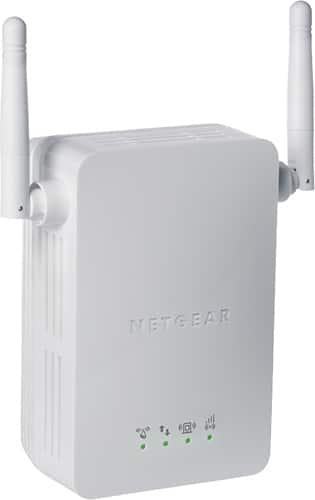
            I ran 3 cables to the other end of the house years ago (probably cat 5) and thats fine for a server I keep down there and ethernet for LOML's office. Wifi is a PITA down there. I installed a simple repeater like the one below midway through the house and it helps with the signal strength but bandwidth sucks. it also has a mind of its own and locks up/resets on a random basis.


            I tried a few times to use a spare router as a remote access point but ended up getting all sorts of DHCP confusion. Undoubtedly some user error in the setup but the hassle factor made the repeater solution more favorable even given the drawbacks.
            Jon

            Phoenix AZ - It's a dry heat
            ________________________________

            We all make mistakes and I should know I've made enough of them
            techzibits.com

            Comment

            • atgcpaul
              Veteran Member
              • Aug 2003
              • 4055
              • Maryland
              • Grizzly 1023SLX

              #7
              I'm using Windows Media Center to record. I know some versions of WMC can be set to record at a lower resolution, but apparently not mine. I use Handbrake to transcode my DVD rips to mp4. I'm exploring transcoding my wtv files to mp4 so if my network is slow, it won't be as much of an issue I have now. I've just started trying out a program that will watch a certain folder and do the transcoding automatically.

              The connections are all wired connections from my PC to the Pi. I'm using the Ethernet over power because the streaming PC is on the opposite end of the house and upstairs that is not wired for Ethernet. The stuttering is new within the past 2 months but I've been using the Ethernet over power for ~10 months. Sometimes, though, even those HD shows stream fine.

              I have thought of bipassing Ethernet over power to diagnose the problem but the activation energy to move the PC and accessories downstairs is lacking. The desktop has wireless capability so maybe I can come up with something. The wireless signal isn't strong enough from that corner bedroom to the LR, though.

              How about this? I could connect a laptop to the router where the Pi is connected and try one of those Internet speed test websites. Then run the same test with the laptop connected to the hub where the PC is located. If I got equivalent speeds, would that rule out the Ethernet over power?

              My router and hub are not gigabit. I'm pretty sure they go to 100Mb.

              Comment

              • poolhound
                Veteran Member
                • Mar 2006
                • 3196
                • Phoenix, AZ
                • BT3100

                #8
                Originally posted by atgcpaul
                I'm using Windows Media Center to record. I know some versions of WMC can be set to record at a lower resolution, but apparently not mine. I use Handbrake to transcode my DVD rips to mp4. I'm exploring transcoding my wtv files to mp4 so if my network is slow, it won't be as much of an issue I have now. I've just started trying out a program that will watch a certain folder and do the transcoding automatically.

                The connections are all wired connections from my PC to the Pi. I'm using the Ethernet over power because the streaming PC is on the opposite end of the house and upstairs that is not wired for Ethernet. The stuttering is new within the past 2 months but I've been using the Ethernet over power for ~10 months. Sometimes, though, even those HD shows stream fine.

                I have thought of bipassing Ethernet over power to diagnose the problem but the activation energy to move the PC and accessories downstairs is lacking. The desktop has wireless capability so maybe I can come up with something. The wireless signal isn't strong enough from that corner bedroom to the LR, though.

                How about this? I could connect a laptop to the router where the Pi is connected and try one of those Internet speed test websites. Then run the same test with the laptop connected to the hub where the PC is located. If I got equivalent speeds, would that rule out the Ethernet over power?

                My router and hub are not gigabit. I'm pretty sure they go to 100Mb.
                I understand that moving things is a pain but its the only real way to get to the heart if the problem. Those internet speed tests are not really going to give you anything diagnostically useful.

                If you can prove the issue with one particular file can you not bring the pi up to the computer attached to a small tv or monitor. OR as you seem to have a laptop put the file on the laptop and stream it to the pi from the same location as the PC (using the same network connections). This would give you a baseline and also identify if in act your PC is the source of the problem. When you have the baseline take the laptop closer to the PI and try again bypassing the the EthOvPower.
                Jon

                Phoenix AZ - It's a dry heat
                ________________________________

                We all make mistakes and I should know I've made enough of them
                techzibits.com

                Comment

                • dbhost
                  Slow and steady
                  • Apr 2008
                  • 9523
                  • League City, Texas
                  • Ryobi BT3100

                  #9
                  Originally posted by poolhound
                  DB you can come and rewire my network any time you like

                  I work from home and my office is at one end of a long single story ranch style home. My DOCSIS 3 modem and router are in my office so connections are fine there. The other end of the house is more of a pain.

                  I ran 3 cables to the other end of the house years ago (probably cat 5) and thats fine for a server I keep down there and ethernet for LOML's office. Wifi is a PITA down there. I installed a simple repeater like the one below midway through the house and it helps with the signal strength but bandwidth sucks. it also has a mind of its own and locks up/resets on a random basis.


                  I tried a few times to use a spare router as a remote access point but ended up getting all sorts of DHCP confusion. Undoubtedly some user error in the setup but the hassle factor made the repeater solution more favorable even given the drawbacks.
                  It all depends on the construction of the residence. I have done LOTS of cabling over the years... The hard part is crawling around the attics, and going between floors...

                  Not sure what the circumstances in the house are, but the gain of the WiFi router has a LOT to do with where your "bubble" will reach to. My router is on the far back corner of the house, and I get a full 5 bars reception diagonally the other way across the street with my Buffalo router. My old Linksys POS was nothing but a wireless nightmare...
                  Please like and subscribe to my YouTube channel. Please check out and subscribe to my Workshop Blog.

                  Comment

                  • dbhost
                    Slow and steady
                    • Apr 2008
                    • 9523
                    • League City, Texas
                    • Ryobi BT3100

                    #10
                    Originally posted by atgcpaul
                    I'm using Windows Media Center to record. I know some versions of WMC can be set to record at a lower resolution, but apparently not mine. I use Handbrake to transcode my DVD rips to mp4. I'm exploring transcoding my wtv files to mp4 so if my network is slow, it won't be as much of an issue I have now. I've just started trying out a program that will watch a certain folder and do the transcoding automatically.

                    The connections are all wired connections from my PC to the Pi. I'm using the Ethernet over power because the streaming PC is on the opposite end of the house and upstairs that is not wired for Ethernet. The stuttering is new within the past 2 months but I've been using the Ethernet over power for ~10 months. Sometimes, though, even those HD shows stream fine.

                    I have thought of bipassing Ethernet over power to diagnose the problem but the activation energy to move the PC and accessories downstairs is lacking. The desktop has wireless capability so maybe I can come up with something. The wireless signal isn't strong enough from that corner bedroom to the LR, though.

                    How about this? I could connect a laptop to the router where the Pi is connected and try one of those Internet speed test websites. Then run the same test with the laptop connected to the hub where the PC is located. If I got equivalent speeds, would that rule out the Ethernet over power?

                    My router and hub are not gigabit. I'm pretty sure they go to 100Mb.
                    That *should* work. FWIW, full HD at 100 mb/s is cutting it awfully close bandwidth wise. If there is much else going on in the network it could end up just chugging along kind of painfully.

                    A bandwidth report from your router would be most helpful in troubleshooting the issues... (If your router firmware is capable of keeping logs / reports).
                    Please like and subscribe to my YouTube channel. Please check out and subscribe to my Workshop Blog.

                    Comment

                    • atgcpaul
                      Veteran Member
                      • Aug 2003
                      • 4055
                      • Maryland
                      • Grizzly 1023SLX

                      #11
                      Originally posted by poolhound
                      If you can prove the issue with one particular file can you not bring the pi up to the computer attached to a small tv or monitor. OR as you seem to have a laptop put the file on the laptop and stream it to the pi from the same location as the PC (using the same network connections). This would give you a baseline and also identify if in act your PC is the source of the problem. When you have the baseline take the laptop closer to the PI and try again bypassing the the EthOvPower.
                      That's a good idea--copying the file onto the laptop and streaming to the pi connected to the same router to bypass EthOvPower. The pi only has HDMI out and the only HDMI connection I've got is to the big TV it's already connected to. I guess I can also trying streaming from the laptop connected to the same hub as my desktop to rule out the desktop as the bottleneck.


                      Originally posted by dbhost
                      That *should* work. FWIW, full HD at 100 mb/s is cutting it awfully close bandwidth wise. If there is much else going on in the network it could end up just chugging along kind of painfully.

                      A bandwidth report from your router would be most helpful in troubleshooting the issues... (If your router firmware is capable of keeping logs / reports).
                      I'll see if my router does that.

                      There is a difference between "100MB/s" and "100mb/s". However, is there a difference between "100Mb/s" and "100mb/s"? From what I'm seeing online, you need about 6-10Mb/s for full HD streaming. I saw some places say up to 22Mb/s. I guess every attached device will sap the speed, but I'd think 100Mb/s would be plenty.

                      Comment

                      • dbhost
                        Slow and steady
                        • Apr 2008
                        • 9523
                        • League City, Texas
                        • Ryobi BT3100

                        #12
                        Sorry about my lazy / errant capitalization.

                        The difference is actually between MB (megabyte) and Mb (megabit). The b is lower case (smaller) for bits vs bytes. Networking protocols typically measure transfer rates in bits, not bytes.

                        http://en.wikipedia.org/wiki/Data_rate_units

                        Generally speaking, yes, every device saps bandwidth. I generally assume a fairly busy network (probably a bad assumption, but due to my work I like to assume safe) and do not like streaming HF on fast ethernet (100 Mb/s) networks. I know what the specs and standards say, and yes, It works, I just don't trust it... I've seen too many home networks with just a few devices streaming media come to a crawl over fast ethernet / slow WiFi...

                        There are other factors that might be at play here... Such as what is the server you are hosting the files on? Disk performance or lack thereof could be a huge factor here. While my router DOES work for streaming, disk access is slow, and really my bottlneck. (The USB disk port on the router is USB 2.0, the drive is USB 3.0 and negotiation between the two throttles throughput to roughly USB 1.1 speeds... Yuck.)
                        Please like and subscribe to my YouTube channel. Please check out and subscribe to my Workshop Blog.

                        Comment

                        Working...